How to Apply for the BTZO Affiliate Program
1. Feature Overview
The BTZO Affiliate Program allows eligible users to earn commissions by referring new users to BTZO. Affiliates can track performance through an affiliate dashboard and manage referral links after approval.
2. When to Use It
Use this process when:
-
You want to apply to become a BTZO affiliate
-
You plan to promote BTZO through social media, content, or communities
-
You want access to affiliate referral tools and performance tracking
3. Step-by-Step Instructions
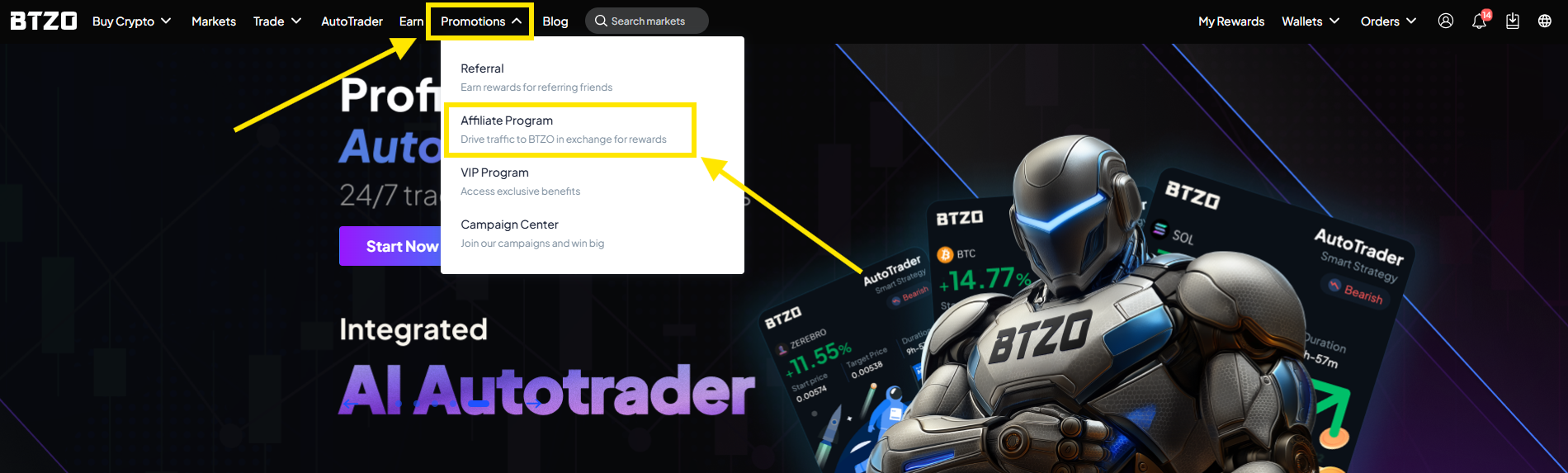
Step 1: Open the Affiliate Program Page
-
Log in to your BTZO account
-
Go to Promotions
-
Select Affiliate Program
https://www.btzo.com/en/affiliate/apply-form
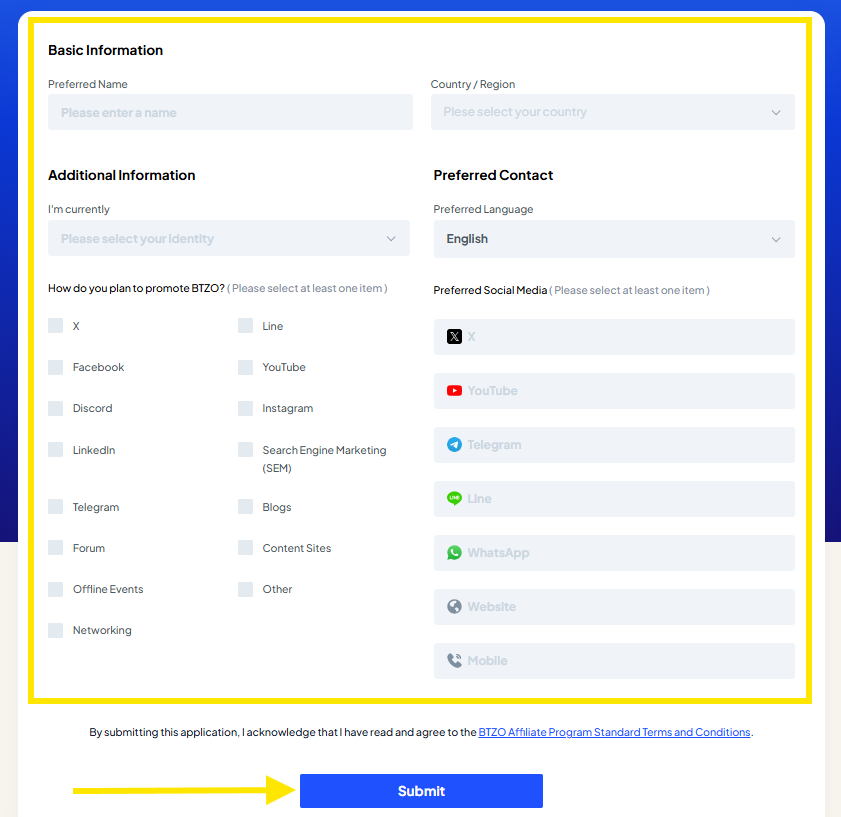
Step 2: Fill in the Affiliate Application Form
Complete the form fields shown on the application page. These typically include:
Basic Information
-
Preferred Name
-
Country / Region
Additional Information
-
“I’m currently” (select your identity)
How do you plan to promote BTZO? (select at least one)
-
Options may include: X, Facebook, Discord, LinkedIn, Telegram, Forum, Offline Events, Networking, Line, YouTube, Instagram, Search Engine Marketing (SEM), Blogs, Content Sites, Other
-
Preferred Contact
-
Preferred Language
Preferred Social Media (select at least one)
-
Options may include: X, YouTube, Telegram, Line, WhatsApp, Website, Mobile
-
Step 3: Submit Your Application
-
Review your details to ensure they are accurate
-
Click Submit
Step 4: Application Review and Follow-Up
-
Your application will be reviewed by the BTZO team
-
If additional information is needed, the team may contact you
-
If approved, a Business Development (BD) representative will contact you to discuss next steps
Step 5: After Approval (What You Can Do Next)
Once your application is approved:
-
You will be able to access your affiliate dashboard
-
You can generate and share your referral link to invite users
-
You can track your referrals and commissions through the dashboard
4. Expected Result
-
Your affiliate application is submitted successfully
-
BTZO reviews your application
-
If approved, you receive access to affiliate features, including referral links and dashboard tools
5. Notes / Best Practices (Optional)
-
Select promotion channels that match how you actually plan to promote BTZO (this helps speed up review)
-
Ensure your preferred contact method is reachable to avoid delays
Incomplete selections (for required “select at least one” fields) may prevent submission or delay review
Related Articles
How to Use the BTZO Affiliate Dashboard
1. Feature Overview The Affiliate Dashboard allows affiliates to monitor referrals, manage rebate settings, track performance, view commissions, and manage referral links from one central location. This dashboard provides full visibility into: Your ...Referral Program
BTZO Referral Program 1. Referral Benefits 2. Referral Program Guide 3. Frequently Asked Questions1. Referral Benefits What is the BTZO Referral Program? ● The BTZO Referral Program is a rewards system that provides fixed commission rates for ...BTZO KOL-Specific Campaigns – Terms & Conditions
These Terms & Conditions ("T&Cs") govern all Key Opinion Leader (KOL)–specific campaigns, referral promotions, trading events, and incentive programs ("KOL Events") conducted on the BTZO platform. By participating in any KOL Event, users agree to be ...How BTZO Cash Can Be Utilized
1. Feature Overview BTZO Cash is a reward balance that provides trading fee rebates, not withdrawable funds. It is issued through the BTZO Rewards Hub and is used to rebate eligible trading fees based on predefined rules. BTZO Cash is benchmarked 1:1 ...How to Register on the BTZO App
1. Feature Overview Account registration allows users to create a BTZO account using their email address. A registered account is required to access trading features, rewards, and account services on the BTZO App. 2. When to Use It Use this process ...